How to Make Nursery Rhyme Videos with AI: a Step-by-Step Guide
Make nursery rhyme videos with Everygen AI. Follow a real 15-second rabbit example, from original lyrics and a template prompt to generated singing and captions.
To make nursery rhyme videos with Everygen AI, write a short verse, choose an animation template and describe the character, actions and singing in your prompt. With a video model that supports audio, you can try generating the animation and song together, then review the output and prepare the finished clip.
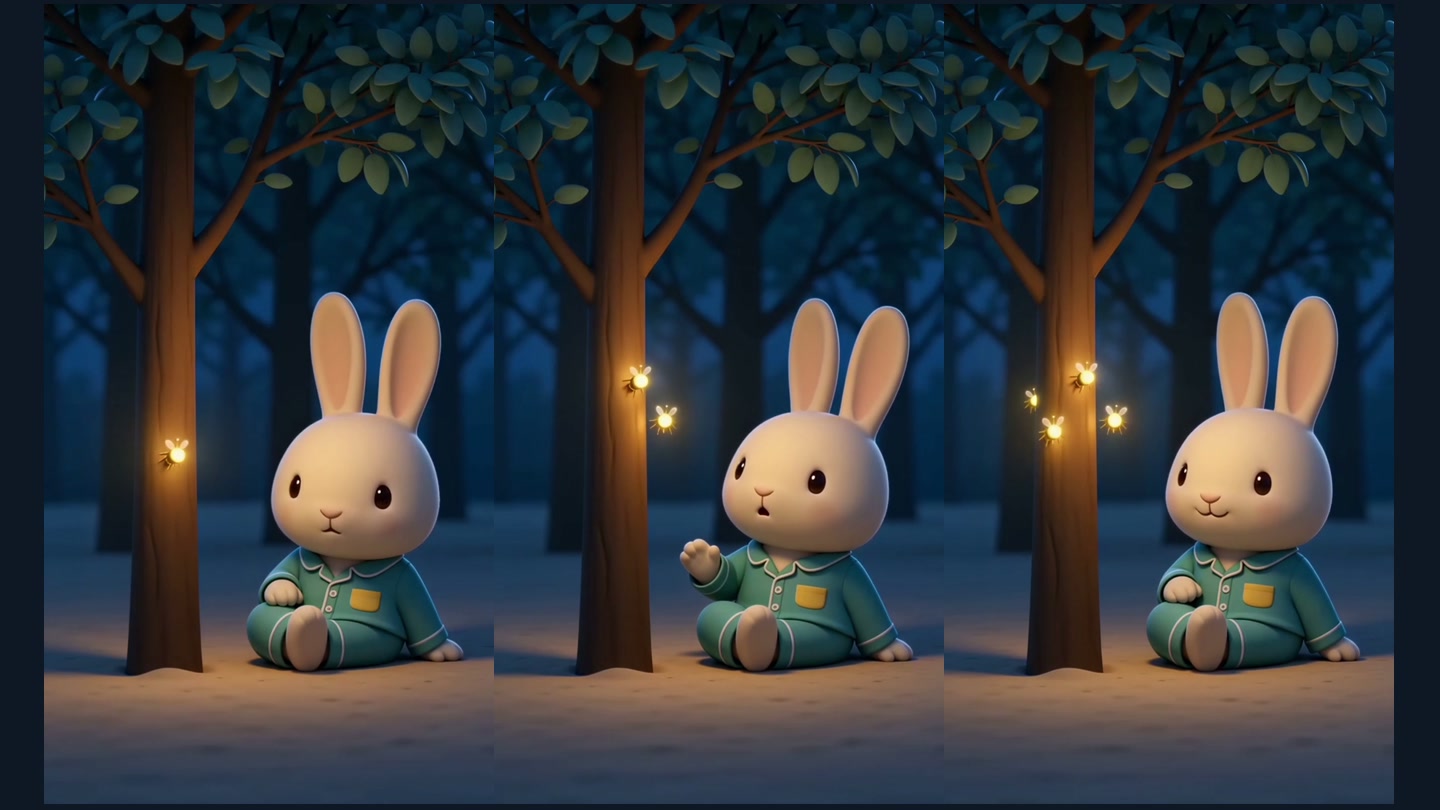
This guide follows Bunny Counts the Fireflies: a cream-colored rabbit in teal pajamas notices one, two and three fireflies before waving goodnight. Below are the actual video, the submitted prompt and the review findings from this example.
1. Watch the nursery rhyme made for this guide
Open or save this nursery rhyme video.
The rabbit example was generated through the project's video API on October 26, 2026. The animation, vocals and accompaniment came from one generation. The displayed version adjusts the visual timing and adds line-by-line lyric captions.
This version puts all four lyric lines into one continuous 15-second shot. The rabbit stays in the same clearing while the fireflies and small gestures carry the action. That creates a compact story and reduces the character-matching work associated with separately generated scenes.
2. Prepare short lyrics and a clear character description
Choose a theme before writing the verse. For this example, counting fireflies leads naturally into a quiet goodnight:
One little glow by the tree,
Two little glows wink at me.
Three little glows, soft and bright,
Bunny waves and says goodnight.
These four lines were written for the example. Next, define the character: a cream-colored baby rabbit with long ears, teal pajamas, one yellow chest pocket and no hat. Put those details together in the prompt and use them as a checklist when reviewing the output.
| Preparation | What this example uses |
|---|---|
| Theme | Counting fireflies in a quiet bedtime setting |
| Lyrics | The four original English lines above |
| Character | A cream-colored rabbit in teal pajamas |
| Visual sequence | One firefly → two → three → a goodnight wave |
| Music direction | An original melody, soft accompaniment and clear English singing |
| Uploaded image or audio | None; this run uses Text to Video |
The singer is off-screen, so the rabbit does not need lip-sync. Simple gestures also make it easier to judge whether the picture supports each lyric line.
3. Choose a nursery-rhyme template
Open Everygen Studio, labeled Shorts Studio in the sidebar. Select Animation in the idea collection and open Moonlit forest lullaby. Read Starter prompt, then choose Use template.
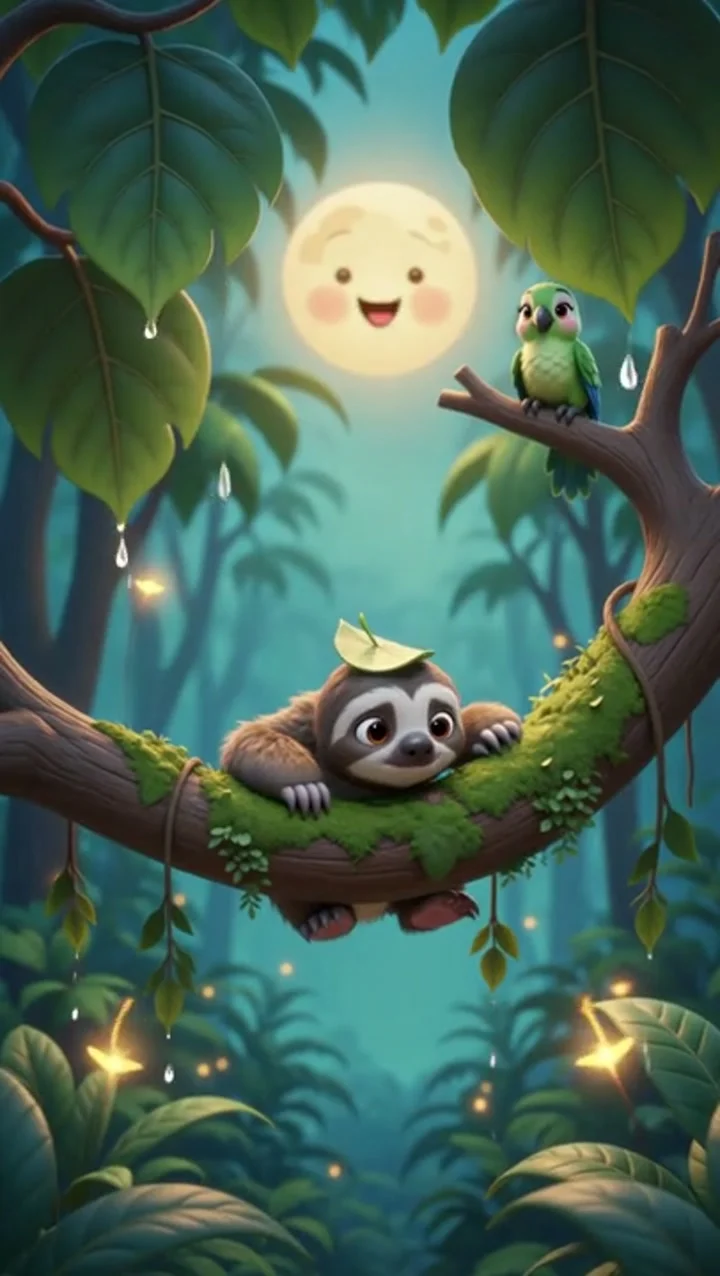
This image shows the Moonlit forest lullaby template example in the Studio idea collection. Its bedtime mood and rounded animation style informed the new rabbit character, lyrics and actions. The video at the start of this article is the newly generated result.
The template already suggests a nighttime forest, soft light and unhurried movement. Those elements suit a short nursery rhyme. Applying it supplies a starting prompt; check your selected model, duration, framing and audio controls afterwards. The sample's original settings are not the settings of your new request.
4. Rewrite the template as Bunny Counts the Fireflies
The current template's starter prompt is:
A fluffy baby sloth with a tiny leaf hat hangs from a mossy branch in a softly glowing cartoon rainforest at dusk. It gives a slow sleepy yawn and curls into the branch as fireflies pulse nearby. Cozy emerald and gold palette, gentle rounded 3D animation, very slow camera drift. Vertical 9:16 composition, 5 seconds.For this run, the sloth becomes a rabbit, and yawning becomes a sequence of noticing, counting and waving goodnight. The revised prompt also includes the complete lyrics and music direction. This is the actual text submitted for the example:
Create a complete 15-second vertical nursery-rhyme video called "Bunny Counts the Fireflies", with synchronized original singing and music. Soft rounded 3D cartoon animation, warm and gentle bedtime mood. One cream-colored baby rabbit with long upright ears wears teal pajamas with exactly one yellow chest pocket and no hat. The rabbit sits beside a small tree in a quiet forest clearing at dusk. Muted blue-green leaves, soft warm moonlight, simple uncluttered background. Keep the rabbit's face, ear shape, clothing and body proportions consistent. Eye-level medium-wide locked camera, one continuous take, no cuts. Keep the lower part of the frame uncluttered for lyrics added later.

Tell one short counting story in order, approximately matching the four sung lines. First, ONE distinct golden firefly hovers beside the tree; the rabbit notices it and gently raises a paw. Then a SECOND firefly joins it; keep the two insects clearly separated, and the rabbit looks between them. Then a THIRD firefly joins to form a loose arc; show exactly three distinct insects and let the rabbit smile. Finally, the rabbit gives a small goodnight wave, rests its paw and closes its eyes as the three fireflies glow softly. No other glowing dots or extra insects; make the count readable. Gentle firefly movement, no flashing. Finish the wave and singing before the end, leaving a brief calm final pose.

Audio is essential: generate a new original children's melody, soft music-box notes, light warm plucked accompaniment, and one gentle adult female voice singing clearly in English. Start singing within the first half-second, with no long instrumental intro. Sing these exact four lines once, in this order, fitting all four into 15 seconds with the last word finished by about 14 seconds:
"One little glow by the tree,
Two little glows wink at me.
Three little glows, soft and bright,
Bunny waves and says goodnight."
Use an original melody, not the melody of an existing song. The singer is off-screen; the rabbit does not need lip-sync. Keep the voice clearly above the music. No additional spoken words or repeated lyric lines. Let the final musical note resolve softly. No on-screen text, no subtitles, no logos or watermarks. Vertical 9:16, 720p, 15 seconds.
Each change has a practical purpose:
| Change | Purpose |
|---|---|
| Specify a rabbit, pajamas and a pocket | Give the character clear features to check in the result. |
| Fit the verse into one continuous shot | Complete a small story with fewer character transitions. |
| Ask for one, two and three fireflies | Connect the visuals to the counting; inspect the actual numbers afterwards. |
| Start singing early and finish before the end | Leave time for the four lines and a calm ending. |
| Request an original melody and off-screen singer | Develop a new song without requiring the rabbit to lip-sync. |
| Keep generated text out of the picture | Add lyric text separately with controllable spelling and placement. |
Timing and counting instructions are requests to the model. The video itself determines whether they were followed.
5. Select the model and inspect the actual output
Everygen Studio supports multiple video models. This example uses Seedance 2.0 Fast, a budget-conscious option, to generate a short video with audio from text.
| Item | Recorded for this run |
|---|---|
| Generation date | October 26, 2026 |
| Model | Seedance 2.0 Fast |
| Mode | Text to Video |
| Requested duration | 15 seconds |
| Aspect ratio | 9:16 |
| Requested resolution | 720p |
| Audio direction | English singing and original accompaniment |
| Reference image, video or audio inputs | None |
| Returned file | 720 × 1280, 24 fps, approximately 15.04 seconds, with stereo audio |
The example was submitted through the project's video API; the table records that request and its returned file. In Studio, choose the corresponding mode and model, enter the prompt, review the available settings and current estimate, then select Generate Video. Open Output for your result; Sample contains an existing demonstration.
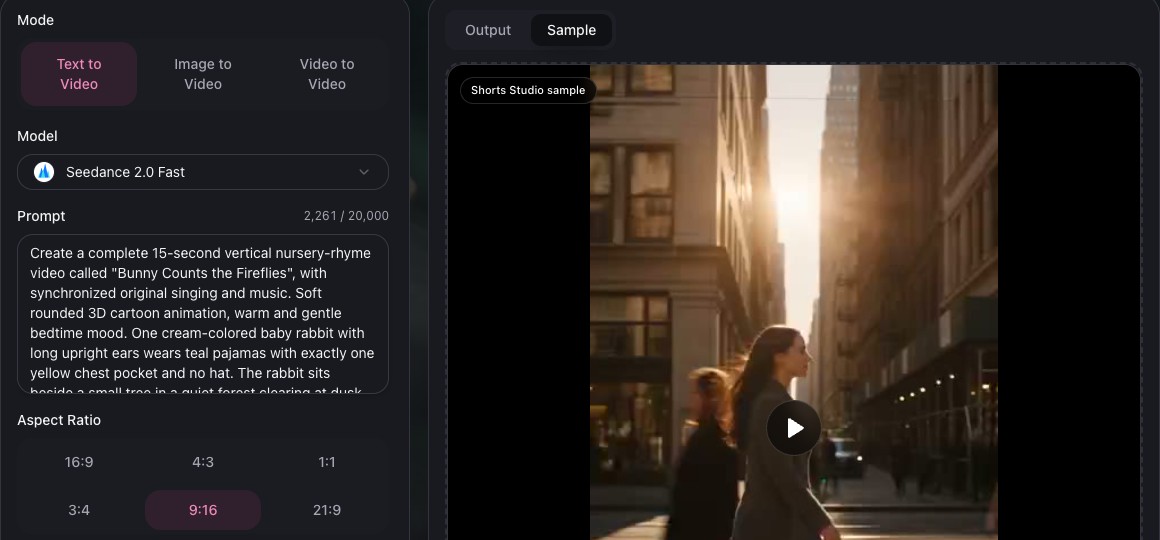
Studio settings illustrated on October 26, 2026, using this prompt with Text to Video, Seedance 2.0 Fast, 15 seconds, 9:16, 720p and With Audio. This capture explains the web controls; the actual example was submitted through the API. Sample on the right is an existing workspace demonstration.
Watch the complete action and ending, then pause to compare the character, fireflies and background. For the audio, check lyric order, missing words and the last phrase. Here is what the review found:
- Character and action: The rabbit keeps its cream-colored fur, teal pajamas and yellow pocket. The fireflies increase to three, and the ending includes a small wave and closed eyes.
- Lyrics: A transcription of the original audio matches all four written lines in order. The final word ends at approximately 12.95 seconds.
- One correction: The third firefly appears around 4.7 seconds in the raw clip, before the third sung line. Adjusting the visual speed brings the counting closer to the song.
- Scope: These findings describe one actual generation. Changing the lyrics or generating again can produce a different performance and picture.
Open the original generation to compare it with the captioned version.
6. Prepare the lyric text and save the finished clip
The generated vocals and accompaniment were retained; no separate vocal recording or replacement music was added. Finishing involved three steps:
- Adjust the picture to the song. The second line starts around 3.65 seconds, the third at 6.93 seconds and the last at 9.99 seconds. Using these as timing references, change the speed within the continuous shot so the second firefly, third firefly and goodnight gesture sit closer to their respective lyrics. The original audio remains unchanged.
- Add the four English caption lines. Use the actual lyric timings, placing light text on a translucent dark background in the clear ground area at the bottom of the picture. These are the display intervals used:
| Display interval | Lyric |
|---|---|
| 0.03–3.40 s | One little glow by the tree, |
| 3.65–6.70 s | Two little glows wink at me. |
| 6.93–9.80 s | Three little glows, soft and bright, |
| 9.99–14.20 s | Bunny waves and says goodnight. |
- Export and review. Save a vertical 720 × 1280 MP4, check its captions, ending and playback, and retain the original uncaptioned file for comparison. The player at the top shows this finished version.
For lyric captions, show one line at a time and align its start and end to the actual singing. Keep the words away from the character and fireflies, and check readability at phone size.
Generating video with audio is separate from automatic captions and timeline assembly. Studio currently produces individual clips. Captioning and file preparation for this example are finishing steps, not a claim that the workspace performs them automatically.
Frequently asked questions
How long can a nursery rhyme video be?
The selected model and configuration determine the duration of one request. This run requested 15 seconds. For a longer rhyme, plan several sections and match the character, audio and edit across them. This example's length is not a universal model limit.
How do I use my own character?
Replace the character, clothing and appearance details in the prompt, then check that the remaining actions still fit. If you switch to Image to Video, upload your own character image and follow the selected model's input requirements. In either workflow, inspect the result for changes in appearance.
How many credits does it cost?
Use the current estimate shown before generation. Model, duration, resolution, audio and reference inputs can affect the cost, and revisions add to the budget. This article does not turn a single run's cost into a fixed price. See the current Everygen plan details for account rules.
Where can I download the video?
For a result generated in the web workspace, use its download control in Output, subject to your account's current access. The example in this article can also be opened or saved through the link beneath its player.
Will the model sing every lyric correctly?
Check line by line. This result represents one generation; other requests can omit or repeat words, change pronunciation or cut off the ending. Shorter lyrics, less introductory music or a different duration can help when revising a request.
For a first nursery rhyme, start with four lines, one main character and a simple action. Make the picture and song work together as a complete small story before adding more scenes.