I Just Beat the Case AI
Walk out, say the line, and celebrate. Make the I Just Beat the Case AI meme with a photo of yourself or your pet. Original sound included.
The meme in one line
“I just beat the case.”
I Just Beat the Case AI turns one photo into the courthouse walkout meme. Your lead pushes through the glass doors, walks right up to the camera to deliver the line, then celebrates with sideways kicks.
It is made for good news of any size. It works just as well with a pet who looks far too pleased with itself.
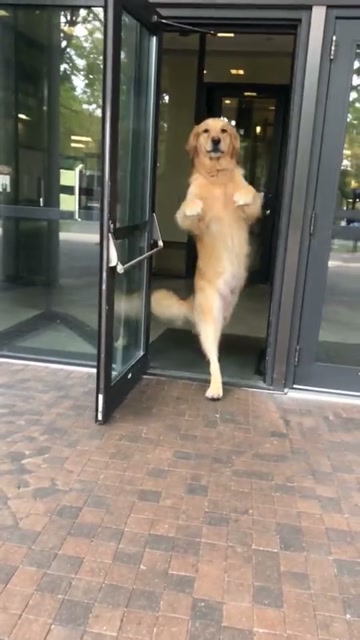
The entrance
The door swings open. A very confident walk toward the camera.
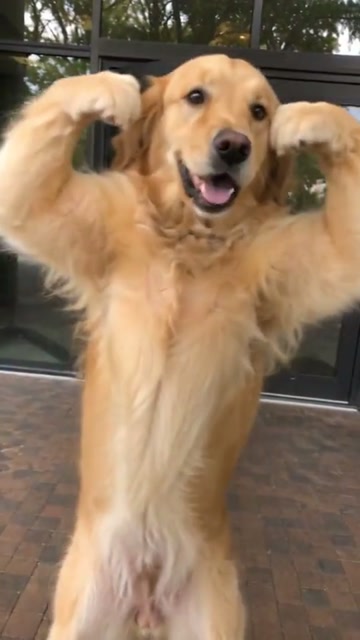
The announcement
Right up to the lens for the line, then both arms go up.
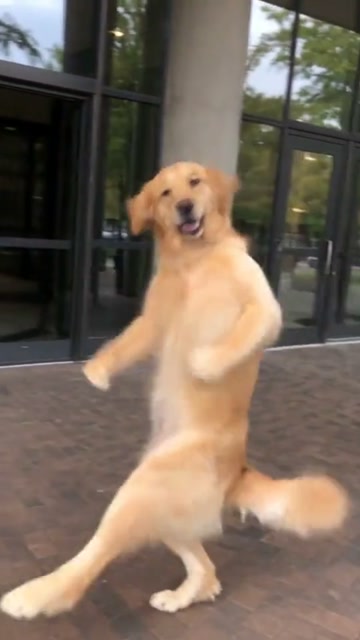
The victory lap
Sideways kicks, a raised fist and one last bounce.
Same walkout, different lead
I Just Beat the Case AI examples
Two takes on the I Just Beat the Case AI meme. Play them with sound to hear the line land right before the dance. A person photo follows the same routine with human hands and feet.
These clips show the routine. Your video is newly generated; appearance, gestures and mouth timing will vary.
A golden retriever makes an entrance. This is the walkout your photo will follow.
A black-and-white dog has its moment. A different face and build give the same joke a different feel.
Your turn at the door
How to make an
I Just Beat the Case AI video
Pick the lead
Choose People or Pets, then add one photo. You do not need a courthouse background or a video of yourself.
Choose the resolution
Select 480p or 720p and check the credit total. The 13-second routine, vertical frame and original sound are already set.
Make it, then turn the sound on
Generate, watch the walkout with sound on and save the MP4. Closed the tab? The finished clip waits in My creations.
The line is half the joke.
Every I Just Beat the Case AI video comes with the original audio: the door, the line and the shouts after it. Turn the sound on when you watch your result. There is no track to find and nothing to record.
A few things to know
I Just Beat the Case AI FAQ
What is I Just Beat the Case AI?
I Just Beat the Case AI recreates the courthouse walkout meme from a single photo: a confident exit, the line “I just beat the case,” and a very loud celebration. You or your pet play the lead. It is a joke, not footage of a real court case.
Does I Just Beat the Case AI work with people as well as pets?
Yes. Choose People for a person or Pets for an animal. Both follow the walkout shown in the sample. The pet version keeps animal features and adapts the gestures to paws; the person version uses human hands and feet.
Do I need a full-body photo?
It helps, since the clip walks and kicks. A sharp knee-up shot can work too, but from a close-up the AI has to invent the outfit and legs. For a pet, pick a shot where its face, coat and legs are all visible.
Do I have to upload a reference video or write a prompt?
No. The walkout is already prepared. Upload one photo, choose People or Pets and select the resolution. Watch the sample first to check that this is the routine you want.
Will I hear “I just beat the case” in my video?
Yes. The door, the line “I just beat the case. I’m back.” and the shouts after it play over your new clip. Nothing records or clones your voice. The movements are newly generated, so the mouth may not hit every word.
Will the video keep the background from my photo?
The video uses the glass-door entrance and walkway shown in the reference. Your photo supplies the lead’s appearance. A simple photo background makes it easier to see the person or pet you want to use.
How many credits does I Just Beat the Case AI use?
130 credits at 480p or 260 at 720p, sound included. Every clip runs 13 seconds and is framed upright for Reels, TikTok and Shorts. A run that fails costs nothing: the credits are refunded.
Can I change the moves or use two people?
This effect has one lead and one fixed walkout. Group photos, a second performer and custom choreography are not part of this version. Choose a photo with just the person or pet you want in the clip.
Photo ready? Make your entrance.
Make your I Just Beat the Case AI video
One photo, 13 seconds, the original sound.
Make my walkoutA fan-made take on a viral meme. Everygen has no connection with whoever filmed or posted the original clip.